Unlock a world of possibilities! Login now and discover the exclusive benefits awaiting you.

Recent Documents
-
Qlik Replicate and Qlik Enterprise Manager Full Load Only task: Reloading multip...
In a Full Load Only task, clicking Reload will reload all tables by default. If you want to reload only specific tables, follow these steps: Open the... Show MoreIn a Full Load Only task, clicking Reload will reload all tables by default. If you want to reload only specific tables, follow these steps:
- Open the Qlik Replicate Console or Qlik Enterprise Manager Console and navigate to the Monitor page for your task
- Stop the task if it is running
- Under the Full Load section, you will see the tables that were previously loaded
- Press and hold the CTRL key, then click to select the tables (A) you want to reload; once selected, click Reload (B)
- The selected tables will appear in the Queued state
- From the Run option menu (A), choose Resume Processing… (B)
- The corresponding tables will then be reloaded.
For an alternative method, see Qlik Enterprise Manager Full Load Only task: How to reload specific tables in a Full Load Only task via REST API.
Environment
- Qlik Replicate: All versions
- Qlik Enterprise Manager: All versions
-
Qlik Enterprise Manager Full Load Only task: How to reload specific tables in a ...
By default, clicking Reload in a Full Load Only task reloads all tables. If you want to reload only specific tables, you can use the REST API. The exa... Show MoreBy default, clicking Reload in a Full Load Only task reloads all tables. If you want to reload only specific tables, you can use the REST API. The examples in this article use curl.
Test Environment (example values)
- Hostname:
qem.qlik.com - Server name:
LocalQR(defined for the Qlik Replicate server) - Task name:
Full_Load_Only - Tables:
dbo.test01, dbo.test02
Replace these values with your own environment details.
Steps:
- Stop the task
Make sure the task is in a Stopped state before reloading tables. - Get the API Session ID:
curl -i -k -u --header "Authorization: Basic cWFAcWE6cWE=" https://qem.qlik.com/attunityenterprisemanager/api/V1/login
A successful response includes the session ID in the header:EnterpriseManager.APISessionID: lfohcqKvZzNdc33_r7NHCw - Save this value for subsequent requests
- Queue a specific table for reload
Use the session ID to add a table (e.g., test01) to the reload queue.This step only queues the table. It does not start the reload yet.
curl -i -k -X POST ^--header "EnterpriseManager.APISessionID: lfohcqKvZzNdc33_r7NHCw" ^--header "Content-Length: 0""https://qem.qlik.com/attunityenterprisemanager/api/V1/servers/LocalQR/tasks/Full_Load_Only/tables?action=reload&schema=dbo&table=test01" - Queue additional tables
Repeat step 4 for each additional table (such as test02) you want to add to the reload queue.curl -i -k -X POST ^--header "EnterpriseManager.APISessionID: lfohcqKvZzNdc33_r7NHCw" ^--header "Content-Length: 0""https://qem.qlik.com/attunityenterprisemanager/api/V1/servers/LocalQR/tasks/Full_Load_Only/tables?action=reload&schema=dbo&table=test02" - Resume the task to start reloading
Once all desired tables are queued, resume the task. At this point, the reload process for those tables will actually begin.curl -i -k -X POST ^--header "EnterpriseManager.APISessionID: lfohcqKvZzNdc33_r7NHCw" ^--header "Content-Length: 0""https://qem.qlik.com/attunityenterprisemanager/api/V1/servers/LocalQR/tasks/Full_Load_Only?action=run&option=RESUME_PROCESSING"
For an alternative method, see Qlik Replicate and Qlik Enterprise Manager Full Load Only task: Reloading multiple selected tables using the web console.
Environment
- Qlik Enterprise Manager: All versions
- Hostname:
-
Is the Qlik Sense Analytics Snowflake ODBC connector developed by Qlik?
The ODBC connector used by Qlik Analytics for Snowflake is developed by Snowflake and integrated into Qlik. Performance and stability are on par with ... Show MoreThe ODBC connector used by Qlik Analytics for Snowflake is developed by Snowflake and integrated into Qlik. Performance and stability are on par with the Snowflake ODBC connector itself.
Environment
- Qlik Cloud Analytics
- Qlik Sense Enterprise on Windows
- Qlik ODBC Connector Package
-
Qlik Replicate: SAP ExtractorTask unloading the extractor data from SAP from a p...
If a Qlik Replicate task with a SAP Extractor endpoint as a source does not stop cleanly (or fails), the SAP Extractor background job may continue to ... Show MoreIf a Qlik Replicate task with a SAP Extractor endpoint as a source does not stop cleanly (or fails), the SAP Extractor background job may continue to run in SAP.
This will cause duplicated data to be read from SAP, as the existing SAP job does not stop if the Qlik Replicate task fails or fails to stop cleanly.
Resolution
Qlik Replicate 2025.11 SP03 introduced a new Internal Parameter to resolve this.
- Go to the SAP endpoint connection
- Switch to the Advanced tab
- Click Internal Parameters
- Enter the parameter removeJobAfterTaskStop
- Set the removeJobAfterTaskStop to true
- Save the endpoint
- Stop and resume any task using the endpoint; this will make sure the changes take effect
Internal Investigation ID(s)
SUPPORT-6807
Environment
- Qlik Replicate
-
Qlik Replicate: ORA-00932 inconsistent datatypes: expected NCLOB got CHAR
PostgreSQL Source tables with a Character Varying (8000) datatype would be created as a Varchar(255) datatype on the Oracle Target tables as the defau... Show MorePostgreSQL Source tables with a Character Varying (8000) datatype would be created as a Varchar(255) datatype on the Oracle Target tables as the default.
This error will occur with the default settings, as Oracle only supports up to 255 characters for the datatype. Incoming records with a character count higher than 255 are treated as a CLOB datatype and cannot fit in all of the incoming 8000 bytes/char of data.
The following error is written to the log:
[TARGET_APPLY ]T: ORA-00932: inconsistent datatypes: expected NCLOB got CHAR [1020436] (oracle_endpoint_bulk.c:812)
Environment
- Qlik Replicate any version
- PostgreSQL Source
- Oracle Target
Resolution
Adjust the datatype in the Qlik Replicate task table settings to transform the character varying (8000) datatypes to a CLOB datatype.
This will create CLOB columns on the target and allow the large incoming records to fit in the target table.
Note that the transformation will need a target table reload to rebuild the table with a new datatype.
Cause
Default task settings create the column with a varchar(255) datatype, while it needs to be a CLOB datatype, as any size over 255 will not fit in the target table if an incoming record exceeds 255 characters in size.
-
REST connection fails with error "Timeout when waiting for HTTP response from se...
After loading for a while, Qlik REST connector fails with the following error messages: QVX_UNEXPECTED_END_OF_DATA: Timeout when waiting for HTTP res... Show MoreAfter loading for a while, Qlik REST connector fails with the following error messages:
- QVX_UNEXPECTED_END_OF_DATA: Timeout when waiting for HTTP response from server
- QVX_UNEXPECTED_END_OF_DATA: Failed to receive complete HTTP response from server
This happens even when Timeout parameter of the REST connector is already set to a high value (longer than the actual timeout)
Environment
Qlik Sense Enterprise on Windows
Timeout parameter in Qlik REST connector is for the connection establishment, i.e connection statement will fail if the connection request takes longer than the timeout value set. This is documented in the product help site at https://help.qlik.com/en-US/connectors/Subsystems/REST_connector_help/Content/Connectors_REST/Create-REST-connection/Create-REST-connection.htm
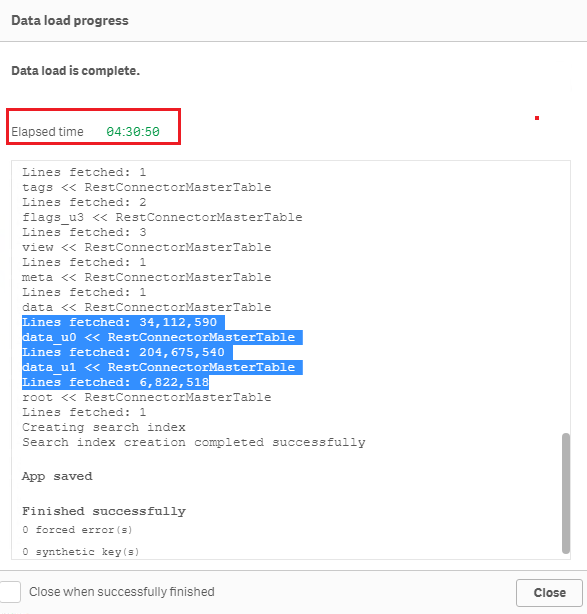
When connection establishment is done, Qlik REST connector does not have any time limit for the actual data load. For example, below is a test of loading the sample dataset "Crimes - 2001 to present" (245 million rows, ~5GB on disk) from https://catalog.data.gov/dataset?res_format=JSON. Reload finished successfully with default REST connector configuration:Therefore, errors like QVX_UNEXPECTED_END_OF_DATA: Timeout when waiting for HTTP response from server and QVX_UNEXPECTED_END_OF_DATA: Failed to receive complete HTTP response from server are most likely triggered by the API source or an element in the network (such as proxy or firewall) rather than Qlik REST connector.
To resolve the issue, please review the API source and network connectivity to see if such timeout is in place. -
Setting Up Knowledge Marts for AI
This Techspert Talks session addresses: Synchronizing data in real time Connecting to Structured and Unstructured data Demonstration of chatbot appl... Show More
-
Qlik Talend Data Integration: tDBConnection adaption for MSSQL Availability Grou...
When setting up a Microsoft SQL Server Always On Availability Group (AG) along with a Windows Failover Cluster, are there any additional SQL Server–si... Show MoreWhen setting up a Microsoft SQL Server Always On Availability Group (AG) along with a Windows Failover Cluster, are there any additional SQL Server–side configurations or Talend-specific database settings required to run Talend Job against a MSSQL Always On database?
Answer
Talend Job need be adapted at the JDBC connection level to ensure proper failover handling and connection resiliency, by setting relevant parameters in the Additional JDBC Parameters field.
Talend JDBC Configuration Requirement
Talend should connect to SQL Server using either the Availability Group Listener (AG Listener) DNS name or the Failover Cluster Instance (FCI) virtual network name, and include specific JDBC connection parameters.
Sample JDBC Connection URL:
jdbc:sqlserver://<AG_Listener_DNS_Name>:1433;
databaseName=<Database_Name>;
multiSubnetFailover=true;
loginTimeout=60
Replace and with your actual values. Unless otherwise configured, Port 1433 is the default SQL Server port.
Key Parameter Explanations
multiSubnetFailover=true
Enables fast reconnection after AG failover and is mandatory for multi-subnet or DR-enabled AG environments.
applicationIntent=ReadWrite (optional, usage-dependent)
Ensures write operations are always routed to the primary replica.
Valid values:
ReadWrite
ReadOnly
loginTimeout=60
Prevents premature Talend Job failures during transient failover or brief network interruptions.Best Practice Recommendation
Before promoting any changes to the Production environment, it is essential to perform failover and reconnection stress tests in the DEV/QA environment. This will help to validate the behavior of Talend Job during:
- AG role switchovers
- Network interruptions
- Planned and unplanned failover scenarios
Related Content
Talend JDBC connection parameters | Qlik Talend Help Center
Microsoft JDBC driver support for Always On / HA-DR | learn.microsoft.com
SQL Server JDBC connection properties | learn.microsoft.com
Environment
-
Qlik Talend Cloud Data Integration: SAP Extractor Initialization Timeout Due to ...
A replication task fails with a start_job_timeout error, and the task logs showthe following messages: [SOURCE_UNLOAD ]E: An FATAL_ERROR error occu... Show MoreA replication task fails with a start_job_timeout error, and the task logs showthe following messages:
[SOURCE_UNLOAD ]E: An FATAL_ERROR error occurred unloading dataset: .0FI_ACDOCA_20 (custom_endpoint_util.c:1155)
[SOURCE_UNLOAD ]E: Timout: exceeded the Start Job Timeout limit of 2400 sec. [1024720] (custom_endpoint_unload.c:258)
[SOURCE_UNLOAD ]E: Failed during unload [1024720] (custom_endpoint_unload.c:442)Resolution
We recommend running the extractor directly in RSA3 in SAP to measure how long it takes to start.
Based on the measured time, adjust the value of the internal parameter start_job_timeout.
The value should be at least 20% higher than the time SAP takes to start.
Cause
Reviewing the endpoint server logs (/data/endpoint_server/data/logs directory) reveals that the job timeout is configured as 2400 seconds: [sourceunload ] [INFO ] [] start_job_timeout=2400
The error occurrs because the job did not start within the configured timeout.
When the task attempted to start the SAP Extractor, SAP did not return the “start data extraction” response within 2400 seconds (40 minutes), causing the timeout.
This may happen for extractors with large datasets, such as 0FI_ACDOCA_20, where the initialization on the SAP side will take a long while.
Environment
- Qlik Talend Cloud Data Integration
-
Qlik Talend Cloud Data Integration: Handling Delete Operations from SAP HANA in ...
The following issue is observed in a replication from a SAP Hana source to a Snowflake target: In the source table, all columns are defined as NOT NUL... Show MoreThe following issue is observed in a replication from a SAP Hana source to a Snowflake target:
In the source table, all columns are defined as NOT NULL with default values.
However, in the replication project, specifically during Change Data Capture, Null Values are sent to the CT table created as part of Store changes. This is observed when Delete Operations are performed in the source.
In this example, the Register task of the Pipeline Project reads data from the Replication Task Target [The data available in Snowflake storage]. When the Storage task is run, the task fails with NULL result in a non-nullable column.
Resolution
When a DELETE operation is performed in SAP HANA, it removes the entire row from the table and stores only the Primary Key values in the transaction logs.
Operation type = DELETE
Default values are not available and not applied.As a result, we can only see values for the primary key columns, and the remaining columns contain the null value in the Snowflake Target (__ct table).
To overcome this issue, please try the following workaround:
-
In the Replicate Project, apply a Global Rule Transformation to handle Null Value being populated in Snowflake.
This is done through Add Transformation > Replace Column Value-
In the Transformation scope step:
- Source schema: %
- Source datasets: %
- Column name is like: %
- Where data is: UNSPECIFIED
- Where column key attribute is: Not a key
- Where column nullability is: Not nullable
- In the Transformation action step
- Replace target value with: $IFNULL(${Q_D_COLUMN_DATA},0)
- Replace target value with: $IFNULL(${Q_D_COLUMN_DATA},0)
-
-
Prepare and run the job
-
Go to Snowflake and check the __CT table entry to verify that there are no more null values for non-primary key columns
-
In the Pipeline Project, use the Register task to load data from the Replication Task
- Data will now successfully replicate in the storage without NULL values
Environment
- Qlik Talend Cloud Data Integration
-
-
Qlik Replicate task using SAP OData as source endpoint fails http 500
A Qlik Replicate task using the SAP OData source endpoint fails with the error: Error: Http Connection failed with status 500 Internal Server Error ... Show MoreA Qlik Replicate task using the SAP OData source endpoint fails with the error:
Error: Http Connection failed with status 500 Internal Server Error
Resolution
Change the SAP OData endpoint by setting Max records per request (records) to 25000.
- Open your SAP OData endpoint
- Switch to the Advanced tab
- Set Max records per request (records) to 25000
Internal Investigation ID
SUPPORT-7127
Environment
- Qlik Replicate
-
Qlik Talend Data Stewardship R2025-02 keeps on loading status On AWS EC2 instanc...
Qlik Talend Data Stewardship R2025-02 keeps on loading and does not open up in Talend Management Console. Resolution Patch fix Apply the latest Patc... Show MoreQlik Talend Data Stewardship R2025-02 keeps on loading and does not open up in Talend Management Console.
Resolution
Patch fix
Apply the latest Patch_20260105_TPS-6013_v2-8.0.1-.zip or latter version of patch
TCP stack tunning
##sysctl
sudo vi /etc/sysctl.conf
#add the following lines
net.ipv4.tcp_keepalive_time=200
net.ipv4.tcp_keepalive_intvl=75
net.ipv4.tcp_keepalive_probes=5
net.ipv4.tcp_retries2=5sudo sysctl -p #activate
MTU change (avoid TCP traffic re-transmission)
temp change without rebooting :
sudo ip link set dev eth0 mtu 1280
Persist on os:
sudo vi /etc/sysconfig/network-scripts/ifcfg-eth0
MTU=1280network_mtu.html | docs.aws.amazon.com
Explanation on the Linux tcp tunning parameters
These sysctl settings are primarily used to make your server more aggressive at detecting and closing "dead" or "hung" network connections. By default, Linux settings are very conservative, which can lead to resources being tied up by connections that are no longer active.
Here is a breakdown of what these specific changes do and why they are beneficial.
TCP Keepalive Settings
The first three parameters control how the system checks if a connection is still alive when no data is being sent (the "idle" state).
net.ipv4.tcp_keepalive_time=200 This triggers the first "keepalive" probe after 200 seconds of inactivity. The Linux default is 7,200 seconds (2 hours). net.ipv4.tcp_keepalive_intvl=75 Once probing starts, this sends subsequent probes every 75 seconds. The default is 75 seconds. net.ipv4.tcp_keepalive_probes=5 This determines how many probes to send before giving up and closing the connection. The default is 9.
The Benefit: In a standard Linux setup, it can take over 2 hours to realize a peer has crashed. With your settings, a dead connection will be detected and cleared in roughly 20 minutes (200 + (75* 5) = 575 seconds). This prevents "ghost" connections from filling up your connection tables and wasting memory.
TCP Retries
net.ipv4.tcp_retries2=5 This controls how many times the system retransmits a data packet that hasn't been acknowledged before killing the connection. The Benefit: The default value is usually 15, which can lead to a connection hanging for 13 to 30 minutes during a network partition or server failure because the "backoff" timer doubles with each retry. By dropping this to 5, the connection will "fail fast" (usually within a few minutes).
This is excellent for high-availability systems where you want the application to realize there is a network issue quickly so it can failover to a backup or return an error to the user immediately rather than leaving them in a loading state.
Summary Table Default Your Values Parameter Default (Approx) Your Value (Impact) Detection Start ~2 Hours ~3.3 Minutes ( Much faster initial check) Total Cleanup Time ~2.2 Hours ~20 Minutes (Frees up resources significantly faster) Data Timeout ~15+ Minutes ~2-3 Minutes(Stops "hanging" on broken paths) Use Cases for These Settings
Microservices: To ensure fast failover and prevent a "cascade" of waiting services in a distributed system.If These changes are not permanent until you add them to /etc/sysctl.conf. Running the command with -w only applies them until the next reboot.
Cause
There are 2 major factors contributing to this issue
- invalid_grant error caused by current design defects
ERROR [http-nio-19999-exec-2] g.c.s.Oauth2RestClientRequestInterceptor : #1# Message: '[invalid_grant] ', CauseMessage: '[invalid_grant] ', LocalizedMessage: '[invalid_grant] '
- EC2 Linux sysctl tcp stack default setting not ideal for clean the hang connections.
Environment
- invalid_grant error caused by current design defects
-
Point Qlik Replicate at an AG Secondary Replica instead of the primary (High Ava...
To point Qlik Replicate at an AG Secondary Replicate instead of the primary, follow these steps; Create the publication/articles/filters the same way... Show MoreTo point Qlik Replicate at an AG Secondary Replicate instead of the primary, follow these steps;
- Create the publication/articles/filters the same way Replicate would or enable MS-CDC per the User's Guide for all the tables in the task.
- Set the SQL Server Source Endpoint internal parameter ignoreMsReplicationEnablement so that Replicate will not check for publication/articles.
- Set the SQL Server Source Endpoint internal parameter safeguardPolicyDesignator to ‘None’ so that Replicate will not try to create a transaction on the source.
- Set the SQL Server Source Endpoint internal parameter AlwaysOnSharedSynchedBackupIsEnabled so that Replicate will not try to connect to all the AG Replicas to read the MSDB.
- Set the SQL Server Source Endpoint ‘Change processing mode (read changes from):’ to ‘Backup Logs Only’
- As part of their transaction log backup maintenance plan, it's needed to run a script to merge the MSDB entries across all the Replicas. This may not be necessary if the backup is done on the secondary Replica that we will be attached to. The backups should also be placed on a share the Replicate can get access to. Optionally use 'Replicate has file-level access' if the backups are not encrypted and Replicate has direct access to them.
- It is needed to create the LSN/Numeric conversion scalar functions on the source database on the secondary.
Limitations include:
- Can read from backups only.
- Manual setup of publications/articles or MS CDC.
- Manual creation of supporting LSN conversion functions
The information in this article is provided as-is and to be used at own discretion. Depending on tool(s) used, customization(s), and/or other factors ongoing support on the solution below may not be provided by Qlik Support.
-
Qlik Sense and the JIRA Connector and JIRA Server: Error when displaying "Projec...
The following error (C) is shown after successfully creating a Jira Connection string and selecting a Project/key (B) from select data to load (A) : F... Show MoreThe following error (C) is shown after successfully creating a Jira Connection string and selecting a Project/key (B) from select data to load (A) :
Failed on attempt 1 to GET. (The remote server returned an error; (404).)
The error occurs when connecting to JIRA server, but not to JIRA Cloud.
Resolution
Qlik Cloud Analytics
Tick the Use legacy search API checkbox. This is switched off by default.
Qlik Sense Enterprise on Windows
This option is available since:
- Qlik Sense Enterprise on Windows May 2025 patch 3 and above,
- Qlik Sense Enterprise on Windows November 2025 IR (Initial Release) and above.
This is required when using both Issues and CustomFieldsForIssues tables.
Cause
Connections to JIRA Server use the legacy API.
Internal Investigation ID(s)
SUPPORT-3600 and SUPPORT-7241
Environment
- Qlik Cloud Analytics
- Qlik Sense Enterprise on Windows

-
Qlik Talend Cloud: An error Interceptor for PairingService has thrown exception,...
GOAWAY is received regularly in the karaf.log. Full error example: | WARN | pool-31-thread-1 | PhaseInterceptorChain | 165 - org.apache.cxf.cxf-core ... Show MoreGOAWAY is received regularly in the karaf.log.
Full error example:
| WARN | pool-31-thread-1 | PhaseInterceptorChain | 165 - org.apache.cxf.cxf-core - 3.6.2 | | Interceptor for {http://pairing.rt.ipaas.talend.org/}PairingService has thrown exception, unwinding now
Caused by: javax.ws.rs.ProcessingException: Problem with writing the data, class org.talend.ipaas.rt.engine.model.HeartbeatInfo, ContentType: application/json
at org.apache.cxf.jaxrs.client.AbstractClient.reportMessageHandlerProblem(AbstractClient.java:853) ~[bundleFile:3.6.2]
... 17 more
Caused by: java.io.IOException: IOException invoking https://pair.eu.cloud.talend.com/v2/engine/3787d7b2-2da7-43be-b6fc-39adab83d51a/heartbeat: GOAWAY receiveResolution
The issue has been mitigated in version 2.13.11 of the Remote Engine. See Talend Remote Engine v2.13.11:
TMC-5486 The engine has been enhanced to retry heartbeat connections when receiving a GOAWAY message. This improves its overall stability. To mitigate the issue, use Java 17 Update 17, released on the 21st of October 2025.
This update includes the fix for the bug JDK-8301255.For example: https://www.azul.com/downloads/?version=java-17-lts&package=jdk#zulu
Cause
This is caused by a defect in JDK 17 (JDK-8301255). See Http2Connection may send too many GOAWAY frames.
Environment
- Qlik Talend Cloud
-
Qlik Replicate and SAP Hana: bad event rowid and operation error
SAP Hana used as a source endpoint in Qlik Replicate may encounter errors processing null values for the SAP Hana ‘Application User’ field: [SOURCE_CA... Show MoreSAP Hana used as a source endpoint in Qlik Replicate may encounter errors processing null values for the SAP Hana ‘Application User’ field:
[SOURCE_CAPTURE ]E: Bad event rowid and operation [1020454] (saphana_trigger_based_cdc_log.c:534)
[SOURCE_CAPTURE ]E: Error handling events for db table id 525063, in the interval (552426485 - 552426767) [1020454] (saphana_trigger_based_cdc_log.c:1725)Resolution
This behavior will be fixed in the Qlik Replicate May 2025 SP04 release. If you need access to a patch before the expected release, contact Qlik Support.
Once fixed, the endpoint identifies the ‘null’ values and handles the data records with a missing “Application User” value.
Cause
Functionality added to Qlik Replicate 2025.5.0 captures the ‘Application User' to populate the USER_ID information in the data records. In particular situations, SAP HANA does not provide an ‘Application User’ value and instead provides a 'null’ value, which causes inconsistency in the fetch data parsing and therefore throws an error as a result of the missing value.
Internal Investigation ID(s)
SUPPORT-5926
Environment
- Qlik Replicate
-
Qlik Talend Data Integration: SQLite general error "Code <14>, Message <UNABLE to="" open="" database="" file="">"</UNABLE>
Qlik Talend Data Integration task was unable to resume with the following error: [SORTER_STORAGE ]E: The Transaction Storage Swap cannot write Event (... Show MoreQlik Talend Data Integration task was unable to resume with the following error:
[SORTER_STORAGE ]E: The Transaction Storage Swap cannot write Event (transaction_storage.c:3321) [DATA_STRUCTURE ]E: SQLite general error. Code <14>, Message <unable to open database file>. [1000505] (at_sqlite.c:525) [DATA_STRUCTURE ]E: SQLite general error. Code <14>, Message <unable to open database file>. [1000506] (at_sqlite.c:475)
Resolution
Freeing up disk space or increase the data directory size usually solves the issue.
Cause
It indicates that Qlik Talend Data Integration was no longer able to access its internal SQLite database (used for the sorter, metadata, and task state management).
When the disk space in the Sorter directory becomes full, SQLite can no longer write to the database, which invariably results in Code 14.
After checking the disk space on the Linux server, it was found that it had indeed reached 100% usage, leaving no free space available which caused the issue.
Environment
-
Qlik Talend Cloud: The Engine 'Cloud Engine for Design' goes off and automatical...
The "Cloud Engine for Design" is just stopping and goes off rather than running constantly once started. Resolution Please confirm if the cloud engi... Show MoreThe "Cloud Engine for Design" is just stopping and goes off rather than running constantly once started.
Resolution
Please confirm if the cloud engine for design is started and try to start the engine explicitly if needed.
The Cloud Engine for Design is reset on a weekly basis. As such, execution logs and metrics on this type of engine are not persistent from one week to the next.
Cause
It is normal behavior.
Basically, the Engine 'Cloud Engine for Design'( CE4Ds) are getting stopped in case of inactivity after some time, but should be woken up if a new request, such as, Pipelines, reaches the engine. The Cloud engine for design are automatically stopped after 6 hours of inactivity and there is no way to "keep it running" continuously.
Related Content
For more information, please refer to below documentation about: starting-cloud-engine | Qlik Talend Help
Environment
-
Qlik Talend Studio: Salesforce Connection Issue - SOAP API login() is disabled b...
While creating a metadata connection to Salesforce in Talend Studio, the connection test fails with the following error message: "SOAP API login() is ... Show MoreWhile creating a metadata connection to Salesforce in Talend Studio, the connection test fails with the following error message:
"SOAP API login() is disabled by default in this org.
exceptionCode='INVALID_OPERATION'"INVALID_OPERATION
Resolution
To resolve this issue, a Salesforce administrator must explicitly enable SOAP API login access in the org before it can be used.
Even when enabled, login() remains unavailable in API version 65.0 and later.
Cause
This error occurs when Talend Studio attempts to authenticate with Salesforce using the SOAP API, but SOAP-based login access is disabled at the Salesforce organization level. As a result, Talend is unable to establish the metadata connection and retrieve Salesforce objects.
The issue is typically related to Salesforce security or API access settings, such as disabled SOAP API access.
Related Content
SOAP API login() Call is Disabled by Default in New Orgs | help.salesforce.com
Environment
-
Qlik Replicate: Using bindDateAsBinary Leads to Data Inconsistencies
A Qlik Replicate task may fail or encounter a warning caused by Data Inconsistencies when using Oracle as a source. Example Warning: ]W: Invalid time... Show MoreA Qlik Replicate task may fail or encounter a warning caused by Data Inconsistencies when using Oracle as a source.
Example Warning:
]W: Invalid timestamp value '0000-00-00 00:00:00.000000000' in table 'TABLE NAME' column 'COLUMN NAME'. The value will be set to default '1753-01-01 00:00:00.000000000' (ar_odbc_stmt.c:457)
]W: Invalid timestamp value '0000-00-00 00:00:00.000000000' in table 'CTABLE NAME' column 'COLUMN NAME'. The value will be set to default '1753-01-01 00:00:00.000000000' (ar_odbc_stmt.c:457)Example Error:
]E: Failed (retcode -1) to execute statement: 'COPY INTO "********"."********" FROM @"SFAAP"."********"."ATTREP_IS_SFAAP_0bb05b1d_456c_44e3_8e29_c5b00018399a"/11/ files=('LOAD00000001.csv.gz')' [1022502] (ar_odbc_stmt.c:4888) 00023950: 2021-08-31T18:04:23 [TARGET_LOAD ]E: RetCode: SQL_ERROR SqlState: 22007 NativeError: 100035 Message: Timestamp '0000-00-00 00:00:00' is not recognized File '11/LOAD00000001.csv.gz', line 1, character 181 Row 1, column "********"["MAIL_DATE_DROP_DATE":15] If you would like to continue loading when an error is encountered, use other values such as 'SKIP_FILE' or 'CONTINUE' for the ON_ERROR option. For more information on loading options, please run 'info loading_data' in a SQL client. [1022502] (ar_odbc_stmt.c:4895)
Resolution
The bindDateAsBinary attribute must be removed or set on both endpoints.
Cause
The parameter bindDateAsBinary means the date column is captured in binary format instead of date format.
If bindDateAsBinary is not configured on both tasks, the logstream staging and replication task may not parse the record in the same way.
Environment
- Qlik Replicate